This is an old revision of the document!
Medical training guide

This is is copied from the document “FINAL MED TRAINING GUIDE”.
Provider preferences and limitations
We are working very hard to make sure patients follow-up with the same provider they are established with or continue care with. If a patient is being scheduled for a follow-up, please make sure they are following up with their PCP. Acute visits (sick, sore throat, cough, uti, etc) anything that would generally take 15 minutes or less can be scheduled with any provider or a same-day appointment even if they are not established with Spectra. Follow-ups from that visit need to be with that same provider.
General things to know/share with patients
- Controlled substances and new patients:
- Past records will need to be faxed – filed with us before any prescription will be given. Please do your best to advise patients that they may not get refills on these medications on the day of their first visit.
- ADHD:
- if there are no records, may require psychological testing to confirm diagnosis. (most especially with adult ADHD) before any medications are prescribed.
- Hip injections:
- providers will see the patient to evaluate but may be referred out.
- - Spectra does not have equipment to do colonoscopy, ultrasound, MRI, or CAT scan. These things may be referred out.
- - Spectra can do x-rays.
Medical clinic addresses and hours of operation
Grand Forks medical clinic
212 South 4th Street, Suite 301
Grand Forks, ND 58201
- Phone number: (701) 757-2100
- Fax number: (701) 757-0305
- Hours of operation:
| Day | Start | End |
|---|---|---|
| Monday | 7:30 AM | 5:00 PM |
| Tuesday | 7:30 AM | 5:00 PM |
| Wednesday | 7:30 AM | 5:00 PM |
| Thursday | 7:30 AM | 5:00 PM |
| Friday | 7:30 AM | 5:00 PM |
Larimore clinic
607 Towner Avenue
Larimore, ND 58251
- Phone number: (701) 343-6418
- Note from IT: This number reaches the same menu as the Grand Forks line, but it’s worth sharing with Larimore patients because it can help them avoid long-distance charges.
- Fax number: (701) 343-2937
- Hours of operation:
| Day | Start | End |
|---|---|---|
| Monday | 7:30 AM | 5:00 PM |
| Tuesday | 7:30 AM | 5:00 PM |
| Wednesday | 7:30 AM | 5:00 PM |
| Thursday | 7:30 AM | 5:00 PM |
| Friday | Closed | Closed |
Provider availability and preferences
Provider availability:
| Provider | Location(s) | Days | Notes |
|---|---|---|---|
| Eric Lunn | Grand Forks and Larimore | GF: Mon, Tue, Thurs Larimore: Wed | |
| Lisa Bernhardt | Grand Forks only | Tues, Wed, Fri | |
| Gail Halversion | Grand Forks only | Tue, Thu | |
| Chris Harsell | Grand Forks only | Mon, Wed, every 3rd Fri | |
| David Sundberg | Grand Forks only | All except Tue | Does not work on Tuesdays |
| Alicia Mack | Grand Forks only | Only Tuesdays | |
| Kristen Young | Larimore only | Mon - Thu |
Teams visits:
- Only 2 visits allowed in the AM.
- Only 2 visits allowed in the PM.
- Additional visits require nursing staff approval.
Provider preferences:
| Provider | Title | Patient age range | Special services / Notes |
|---|---|---|---|
| Eric Lunn | Pediatrician | Newborn - 21 years | Sports physicals |
| Lisa Bernhardt | Adult Gero Nurse Practitioner | 13 years and older | Medication Assisted Treatment (MAT) |
| Gail Halverson | Women's Health Nurse Practitioner | Varies | Well-woman exams, family planning, STI checks (all genders), Nexplanon removals, acute care |
| Chris Harsell | Adult Nurse Practitioner | 13 years and older | MAT, DOT physicals NO joint injections or OB care |
| David Sundberg | Family Nurse Practitioner | 18+ primary care; 1-18 acute only | MAT NO joint injections or OB care |
| Alicia Mack | Family Nurse Practitioner | All ages | Well-child care, sports physicals, DOT physicals, MAT NO joint injections or OB care |
| Kristen Young | Family Nurse Practitioner | All ages | Well-child care, sports physicals, MAT NO joint injections or OB care |
Medical appointment types
| Appointment Type | Duration | Purpose / Use | Follow-Up / Notes |
|---|---|---|---|
| Establish New Patient | 60 min | For patients establishing care, especially for medication management | Assign PCP if continuing care; prior records required |
| MAT Intake | Varies | For new patients starting MAT | Schedule with Chris or Kristen; follow-up every 28–30 days; labs after check-in; avoid Dr. Lunn and Gail |
| Follow-Up | 30 min | For returning patients | Typically requested by provider |
| Office Visit | 30 min | For acute issues or new concerns | For patients not previously seen at Spectra |
| Physicals | 30 min | Routine physicals | Add type in notes: sports, DOT, yearly, women’s |
| Post-Hospital / ER Follow-Up | 30 min | For established patients post-discharge | Schedule within 7 days; PCP only; Charge Nurse approval if new |
| New American | 60 min (provider), 30 min (labs) | For refugee patients referred by Global Friends | Use “New American” type for 30-day follow-up; regular follow-up after that |
Nurse visits
| Visit Type | Duration | Details | Notes |
|---|---|---|---|
| Medical Home Visits | Care coordination | Always with a RN | |
| Standard Nurse Visit | 30 min | Any vaccine needed | Provider visit if more concerns; correct age-appropriate provider if behind on vaccines |
| Depo Shot | Schedule with Gail if outside 3-month window | ||
| B-12 Injection | |||
| Stitch Removal | Ask where stitches are located | ||
| Blood Pressure Check | Approved by nursing if walk-in | ||
| Tb Skin Test | |||
| New American Initial Visit | 60 min | ||
| TTS - Smoking Cessation | With certain nurses | ||
| Lab | Schedule as Walk-in Shlab | ||
| UA | |||
| INR | |||
| MAT | UA/mouth swab/blood draw before provider visit; automatically send to lab | ||
| Outside Lab Orders | Fax to Spectra Health before scheduling or bring paper orders to appointment | ||
| X-Ray | |||
| New American Initial Visit | 30 min | If needed | |
| Outside X-Ray Orders | Fax to Spectra before scheduling or bring paper orders to appointment |
Occ. Health Appointments
- Schedule visit type would be NEW EMP SHOCCH.
- These types of visits would be for new hires. There should be blocks in the Epic Snapboard to schedule appropriately. Can only be scheduled in those blocks provided.
- Unless approved by nursing.
- When flu season approaches, all employees are required to receive vaccines. This will be scheduled DIFFERENTLY – as a nurse visit and appointment notes would say “Employee Vaccine”
Scheduling WSI Visits
See also: How to create WSI
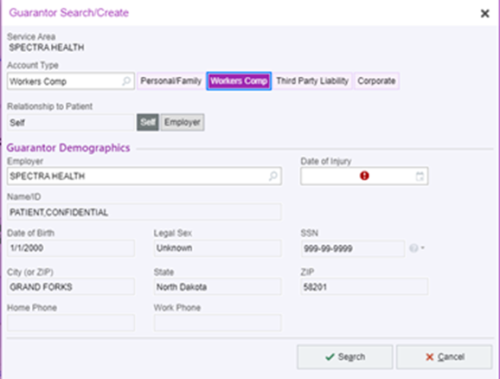
- Schedule to visit as an Office Visit.
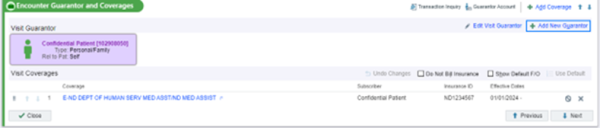
- Be sure to add a new guarantor to the visit registration and attach it by selecting + Add New Guarantor.
- Add Date of Injury.


Phone etiquette
When answering the phones you should answer as:
- “Thank you for calling Spectra Health. This is (your name) how may I help you?
- “Spectra Health this is (your name) how may I help you?”
DO NOT answer the phone as:
- “How can I help you?”
- This is (your name)
- “Hello”
When someone internal is calling ex. (another PSR, Nursing, HR) always answer the same way you would as an external call. With the new phone system, transfers can pop up to look like it’s another employee calling.
Calling patients to schedule/reschedule, returning voicemail, confirming appointments or any other reason:
- Once the patient answers the call, you must state who you are, where you are calling from, and verify at least two pieces of information such as Last Name/ DOB.
- Example: “Hello, this is (your name) with Spectra Health. I was calling to return a voicemail I received regarding an appointment.”

Once a patient answers a call, DO NOT greet them by saying:
- “We need to reschedule your appointment.”
- “Hello, I need to confirm an appointment.”
How to make confirmation calls
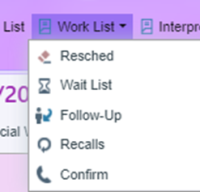
- Click on the Work List at the top of Epic.
- Click Confirm icon.
- On the left side of the pop-up box, you will want to select the SHGF Primary Care option.
- Department list should be: SHGF Primary Care, SHGF Chiropractic, and SHGF Lab.
- Make sure you select Date Range Box and click RUN.
- A list of the upcoming appointments should populate.
- Click on Provider/resource twice. This will help put the time of appointments in order by provider.
- If a patient confirms their appointment right-click in correct patient box and click confirm.
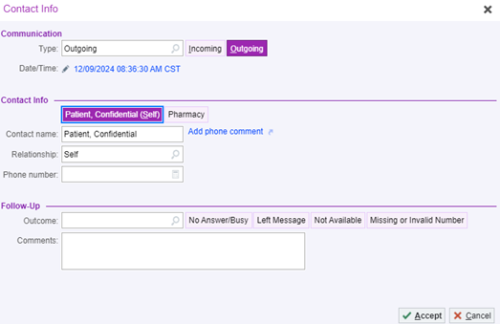
- If a patient does NOT answer the phone, right-click in the correct patient box, click New Call under Contact Info. Click Self. Under Follow-up select the correct outcome of the call made.
- When making a confirmation call, please remember to tell patients that their appointment time is 15 minutes before the scheduled appointment time. For example, if the appointment is at 3:00pm. We should tell them their appointment is at 2:45pm.

Confirmation call script
Answered phone:
- Hello, this is (your name) calling from Spectra Health. May I ask who I am speaking with? (patient answer) Great, can you just confirm your last name and date of birth for me please. I am calling to confirm your appointment with (provider) on (date and time)
Voicemail for Adults (18+ years old):
- Hello, this is (your name) calling from Spectra Health. I was calling as a reminder for (patient first name only) he/she has an appointment for (date and time) with (provider) please give us a call back at 701-757-2100 if you have any questions or need to reschedule. Have a great day, Thank you.
Voicemail for Minors:
- Hello, this is (your name) calling from Spectra Health. I am looking for the parent or guardian of (minor first name) he/she has an appointment for (date and time) with (provider) please give us a call back at 701-757-2100 if you have any questions or need to reschedule. Have a great day, Thank you.
Creating a guarantor
Note: when updating addresses in the demographics portion of the chart, edit the guarantor and select “pull info” to update the contact information. This will help reduce returned mail received by the clinic.
- From the patient chart, open registration and select “Pat Guar and Cvg”
- From “add guarantor” you can search for an already existing guarantor (parent of minors who are Spectra patients or spouse.)
- If a guarantor account is in our system. Highlight the guarantor and click “select”
- Do not use create new as it will create a new account in the system.
- If no guarantor is appropriate, select add guarantor and select either self or the guarantor’s relationship to the patient.
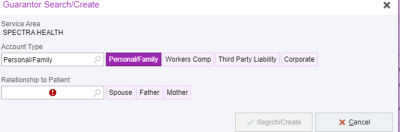
- Enter the guarantor demographics to the best of your ability.
- If a patient is over the age of 18, they are their own guarantor even if they are on parents’ insurance.
- If the patient is married, inquire if they or their spouse has the financial responsibility party. This will often be who the subscriber of the insurance policy.
- If the patient is under 18 years of age, a parent or guardian is the financial responsible party.
- If the patient is under 18 years of age and in foster care or in state custody, they are listed as their own guarantor regardless of age.
- Enter the insurance information as needed. All patients require a guarantor to be checked in for appointments regardless of insurance status.

Adding insurance
See similar information here: Insurance and Registration.
Note: you typically do not need a member ID for ND MA to send a query. The system will pull it unless its ND Medical Expansion.
- From the patient’s chart, select + add coverage on the right-hand side of Encounter Guarantor and Coverages.

- From there, you will enter the patients Insurance Company and select the correct Policy and then select Accept.
- Example (ND BCBS, ND MA, MN BCBS, UNITED HEALTHCARE, AETNA)
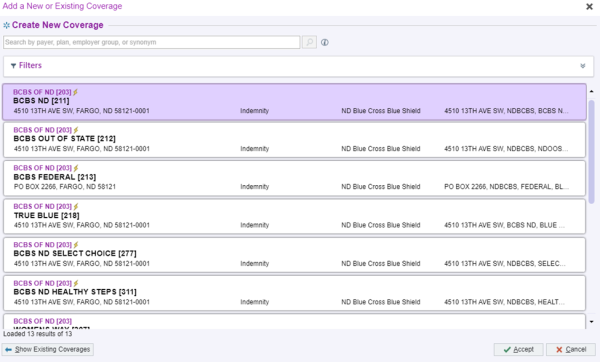
- You will then select the patients name, under who is the subscriber for this coverage.
- Enter in the Member ID Number and select “Send Query”
- Make sure to attach it to the visit and attach the Insurance Card after scanning it into documents. It should give you a warning notice to attach it.


How to count your cash drawer

- Select cash drawer on the top of the epic task bar.
- Count your cash drawer, place the number of bills in correct bill slot (not the dollar amount)
- Select any card/check payments you’ve taken located on the bottom of your screen (Match Drawer Contents to Posted Payments)
- Enter the source and amount that was taken under (Enter Other Sources) on the right-hand side.
- Make sure your drawer is even and green.
- Your deposit number will be the date you closed the till.
- The Collector is yourself.
- Select Deposit.
- Take any cash/check payment and place in envelope. The Envelope, receipts, and end of day closing report get paper-clipped together and put in the green folder with Kelsey/Cole's name.
- After closing out the till. Make sure your balance is still a $150.00 left.
If you have any questions, reach out to Tanner Miller, Kelsey Gunderson or Cole Wandschneider.
Medical clinic checklists

Start of day checklist
| Task | Notes |
|---|---|
| Turn on all lights, login to phone and computers | |
| Count the cash drawer | Should have $150.00 |
| Check voicemails | |
| Open gate | Should be opened by 7:30am |
| Start confirmation calls | By 9am |
| Chart prep for following day |
Afternoon checklist
| Task | Notes |
|---|---|
| Check and return voicemails | For mid-day missed calls |
Closing checklist
| Time of Day | Task | Notes |
|---|---|---|
| Closing | Close cash drawer | |
| Closing | Check and return voicemails | |
| Closing | Wipe down lobby chairs, tables, front desk, elevator, door handles, and workstation | Use Clorox wipes and spray |
| Closing | Close gate | |
| Closing | Shut lights off |
Weekly checklist
| Time of Day | Task | Notes |
|---|---|---|
| Weekly | No show lists | |
| Weekly | Medical clinic work-queue | |
| Weekly | Establish letters | |
| Weekly | Reschedules | |
| Weekly | Wait-list |